
 Hyundai Sonata: AVN Head Unit. Components and Components Location
Components
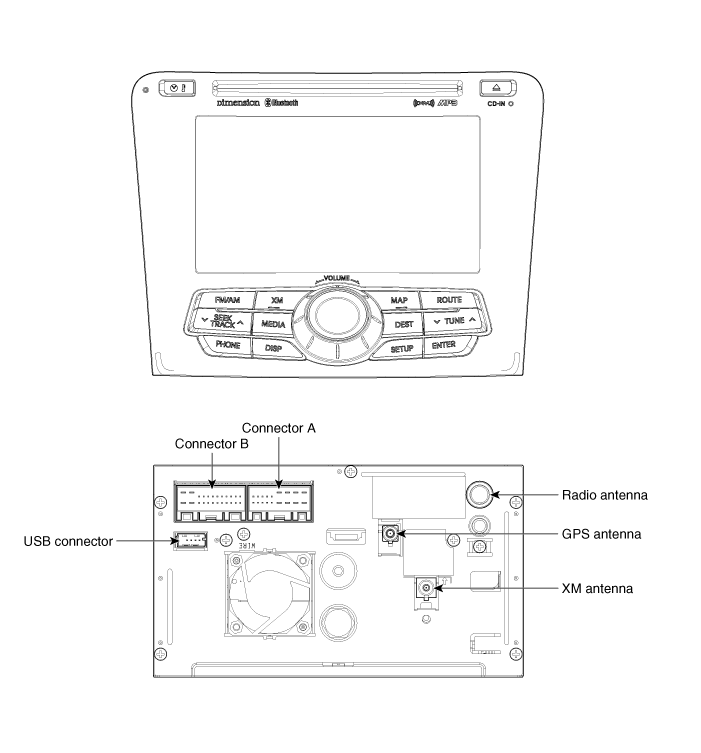
| AVN (A/V & Navigation) Head Unit Connector |
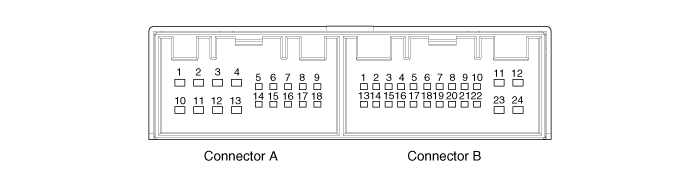
|
Pin No. |
Connector A |
Connector B |
||
|
Description |
Remarks |
Description |
Remarks |
|
|
1 |
- |
- |
CAN H |
Used for CAN network |
|
2 |
- |
- |
- |
- |
|
3 |
- |
- |
- |
- |
|
4 |
- |
- |
Steering remote control |
Steel wheel remote control input |
|
5 |
SP DIF ground |
To EXT AMP |
- |
- |
|
6 |
SP DIF (+) |
To EXT AMP |
- |
- |
|
7 |
ALT |
ALT L |
- |
|
|
8 |
Illumination (+) |
Rheostat from vehicle (+) |
AUX input (RH) |
AUX ST Sound R-CH Input |
|
9 |
R Position |
R Signal |
AUX Ground |
AUX ST sound ground |
|
10 |
- |
- |
MIC+ (Bluetooth) |
Bluetooth hand free |
|
11 |
- |
- |
ACC (+) |
ACC |
|
12 |
NAVI AMP (-) |
Used for voice recognition |
Battery (+) |
Fused battery power supply (10A) |
|
13 |
NAVI AMP (+) |
Used for voice recognition |
CAN L |
Used for CAN NETWORK |
|
14 |
- |
|
Auto right |
Auto right signal input |
|
15 |
SP DIF (-) |
To EXT AMP |
P Position |
P Position(TGS) signal from vehicle |
|
16 |
DOOR |
Door unlock signal |
Speed |
Speed signal from vehicle |
|
17 |
Illumination (-) |
Rheostat from vehicle (-) |
Steering remote ground |
Steel wheel remote control input |
|
18 |
Remote antenna |
Remote supply for motorised antenna |
- |
- |
|
19 |
|
- |
- |
|
|
20 |
AUX DETECT |
AUX connection DETECT |
||
|
21 |
AUX input (LH) |
AUX ST SOUND L-CH Input |
||
|
22 |
MIC- (Bluetooth) |
Bluetooth hand free |
||
|
23 |
Ground |
Ground |
||
|
24 |
Ground |
Ground |
||
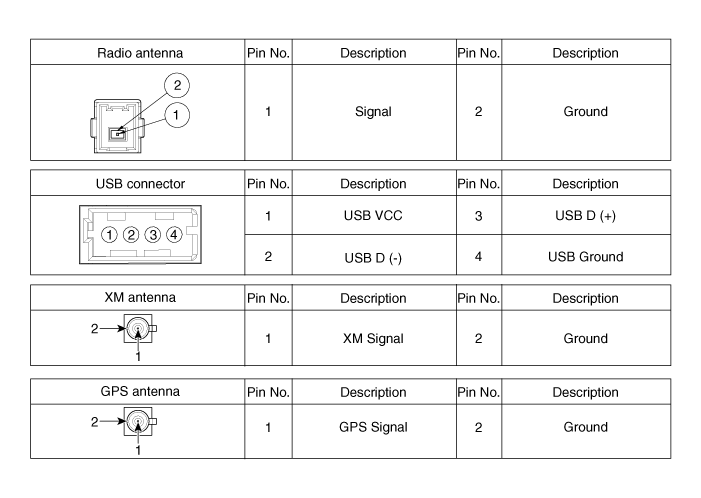
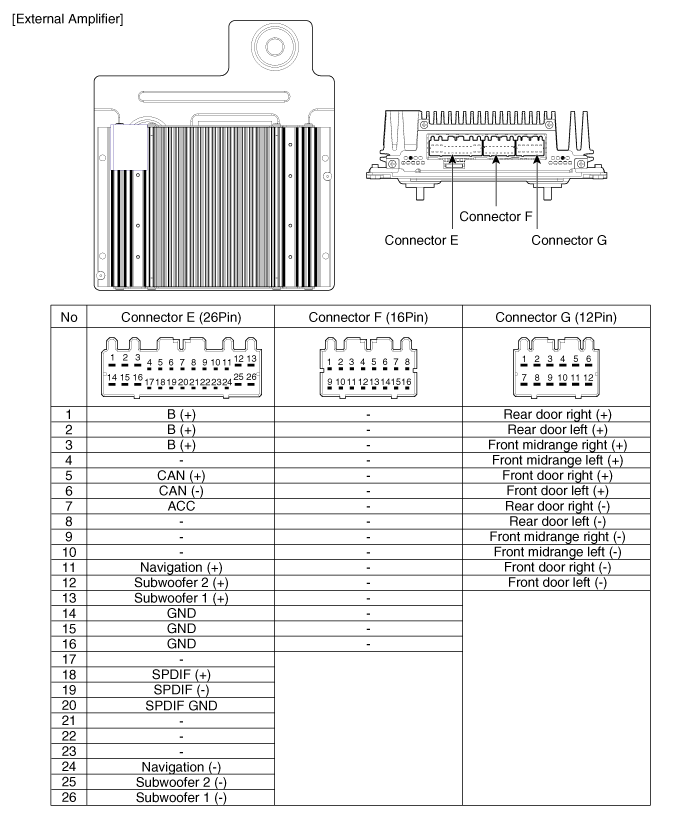
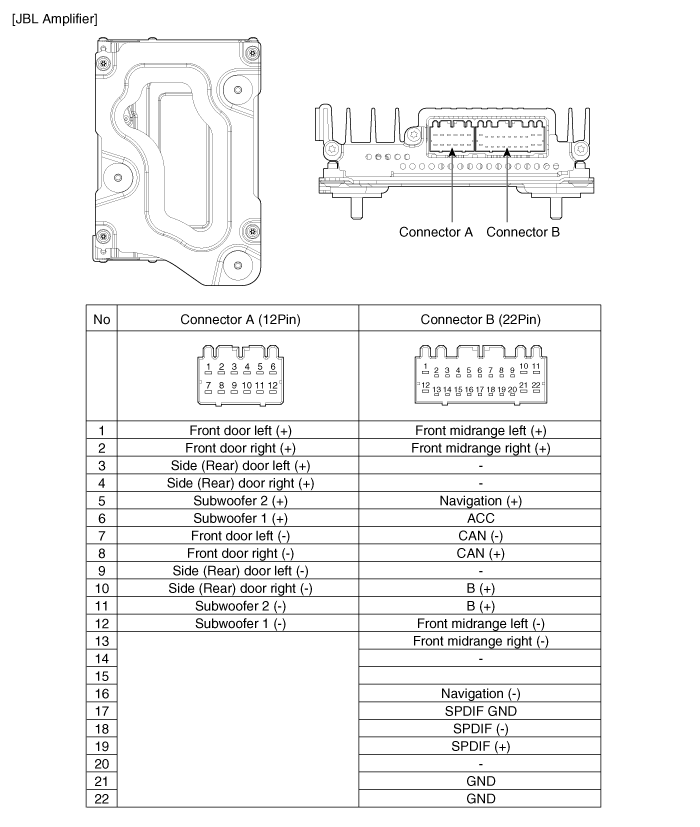
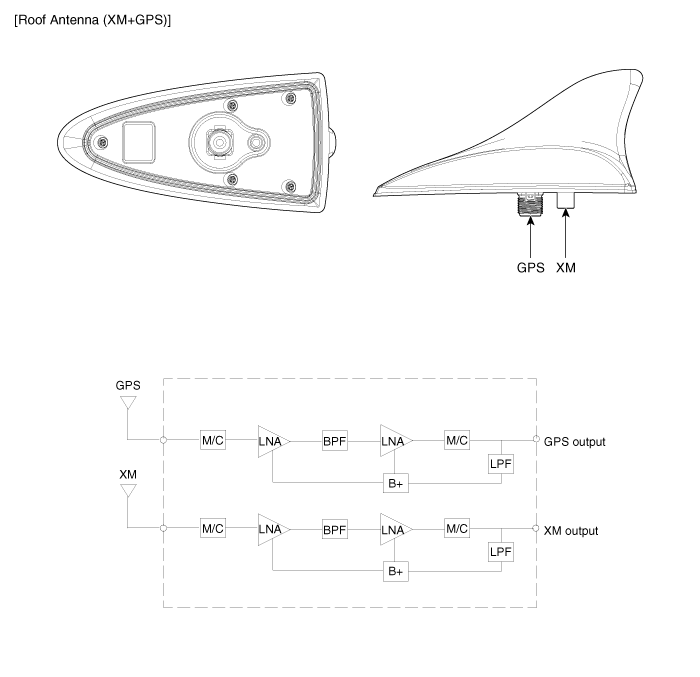
 Description and Operation
Limitations Of The Navigation system
GPS Signal Reception State
As the GPS satellite frequency is received/transmitted in straight lines,
reception may not work if hiding devices are placed ...
 AVN Head Unit. Repair procedures
Removal
AVN Head Unit
•
Take care not to scratch the center fascia panel and related
par ...
See also:
To turn cruise control off, do one of the following
Push the cruise ON/OFF button (the CRUISE indicator light in the instrument
cluster will go off).
Turn the ignition off.
Both of these actions cancel cruise control operation. If you wa ...
Wheel replacement
When replacing the metal wheels for any reason, make sure the new wheels are
equivalent to the original factory units in diameter, rim width and offset.
WARNING
A wheel that is not the correct siz ...
Air conditioning
Push the A/C button to turn the air conditioning system on (indicator light will
illuminate).
Push the button again to turn the air conditioning system off. ...
