
 Hyundai Sonata: Multimedia Jack. Repair procedures
Removal
| 1. |
Remove the shift lever knob.
(Refer to the BD group - "Console")
|
| 2. |
Remove the console upper cover (A).
|
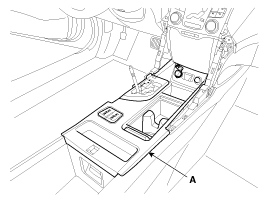
| 3. |
Disconnect the connector (A) from the console upper cover.
|
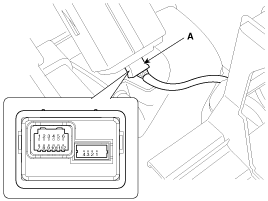
| 4. |
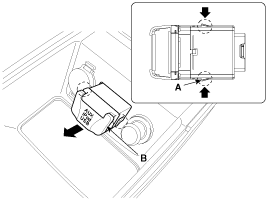
Remove the multimedia jack (B) from the console under cover after
releasing the fixed hooks (A).
|
Installation
| 1. |
Install the multimedia jack.
|
| 2. |
Connect the multimedia jack connector.
|
| 3. |
Install the console upper cover.
|
| 4. |
Install the shift lever knob.
|

 Multimedia Jack. Description and Operation
Description
The multimedia jack on the console upper cover is for customers who like
to listen to external portable music players like the MP3, iPod and etc., through
the vehicle's sound ...
 MTS System
...
See also:
Rear Hub - Carrier. Repair procedures
Replacement
1.
Loosen the wheel nuts slightly.
Raise the vehicle, and make sure it is securely supported.
2.
Remove the rear wheel and ...
SRS Control Module (SRSCM). Repair procedures
Removal
1.
Remove the ignition key from the vehicle.
2.
Disconnect the battery negative cable and wait for at least three
minutes before b ...
Specifications
Specifications
Item
Specification
Transmission type
A6MF2
Engine model
Gasoline 2.4 GDI
Torque conve ...
