
 Hyundai Sonata: Turn by Turn
The Turn by Turn feature can be used through Blue Link.
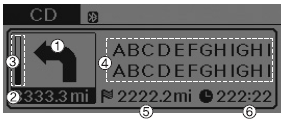
1. Direction Indicator Image
2. Remaining distance until next point
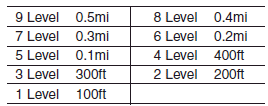
3. The Count bar is divided into a total of 9 levels.
4. Current Street name
5. Distance to destination
6. Expected Time Arrival
❈ For information on specific Blue Link operations, please refer to a separate manual.
 Eco Coach
• What is Eco Coach?
Every 2.5 minutes, Eco Coach compares your fuel economy against the government
tested average (EPA) or other similar Hyundai models (community), based on your
preference. ...
 Driving your vehicle
WARNING - ENGINE EXHAUST CAN BE DANGEROUS!
Engine exhaust fumes can be extremely dangerous. If, at any time, you smell
exhaust fumes inside the vehicle, open the windows immediately.
Do not inh ...
See also:
Catalytic Converter. Description and Operation
Description
The catalytic converter of the gasoline engine is a three way catalyst.
It oxidizes carbon monoxide and hydrocarbons (HC), and separates oxygen from
the oxides of nitrogen (NOx). ...
Troubleshooting
Troubleshooting
Symptom
Suspect area
Engine will not start or struggle to start
Vapor hose damaged or disconnected
Engine strugg ...
Changing the engine oil and filter
Have engine oil and filter changed by an authorized HYUNDAI dealer according
to the Maintenance Schedule at the beginning of this section.
CALIFORNIA PROPOSITION 65 WARNING
Engine oil contains ...
