
 Hyundai Sonata: Vehicle setting
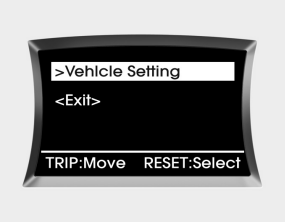
When the vehicle is at a standstill, pressing the TRIP button for more than 2 seconds with the engine start/stop button in the ON position or engine running, the LCD screen on the cluster will change to the vehicle setting mode.
You can change the item by pressing the TRIP button and choose the item by pressing the RESET button.
Auto door lock
Off - The auto door lock operation will be canceled.
Speed - All doors will be automatically locked when the vehicle speed exceeds 9.3mph (15km/h).
Shift Lever (if equipped) - All doors will be automatically locked if the shift lever is shifted from the P(Park) position to the R(Reverse), N(Neutral) or D(Drive) position.
Auto door unlock
Off - The auto door unlock operation will be canceled.
Key Out - All doors will be automatically unlocked when the ignition key is removed from ignition switch (or smart key is removed from the smart key holder).
Door - All doors will be automatically unlocked if the driver's door is unlocked inside.
Shift Lever (if equipped) - All doors will be automatically unlocked if the shift lever is shifted to the P(Park) position.
Two-press unlock
Driver Door 1st Press - The driver's door will unlock when pressing the unlock button on the transmitter or smart key, pressing the button of the driver's outside door handle with the smart key, or inserting the key into the key hole of the driver's outside door and turning the key toward the rear of the vehicle. All doors will unlock when pressing the unlock button on the transmitter or smart key, pressing the button of the driver's outside door handle with the smart key, or inserting the key into the key hole of the driver's outside door and turning the key toward the rear of the vehicle within 4 seconds.
All Doors 1st Press - All doors will unlock when pressing the unlock button on the transmitter or smart key, pressing the button of the driver's outside door handle with the smart key, or inserting the key into the key hole of the driver's outside door and turning the key toward the rear of the vehicle.
Headlamp delay
On - If you turn the ignition switch to the ACC or OFF position with the headlamp ON, the headlamps remain on for about 20 minutes. Also, the headlamp welcome operation will be activated. Refer to the [LIGHTING] section in this chapter.
Off - The headlamp delay and headlamp welcome operation will be canceled.
Horn feedback (if equipped)
On - After locking the door by pressing the lock button on the transmitter, if you press the lock button again within 4 seconds, the warning sound will operate once to indicate that all doors are locked.
Off - The Horn feedback operation will be canceled.
 Gauges
Speedometer
The speedometer indicates the speed of the vehicle.
The speedometer is calibrated in miles per hour and/or kilometers per hour.
Tachometer
The tachometer indicates the approxim ...
 Warnings and indicators
All warning lights are checked by turning the ignition switch ON (do not start
the engine). Any light that does not illuminate should be checked by an authorized
HYUNDAI dealer.
After starting th ...
See also:
Restrictions in handling keys
When leaving keys with parking lot and valet attendants, the following procedures
will ensure that your vehicle’s trunk and glove box compartment can only be opened
with the mechanical key.
L ...
Components and Components Location
Component Location
1. Head lamp (Low)
2. Head lamp (High)
3. Front fog lamp
4. Turn signal/ Position lamp
5. Tail lamp
6. High mounted stop lamp
7. Tail lamp/Stop ...
Front Impact Sensor (FIS). Description and Operation
Description
The front impact sensor (FIS) is installed in the Front End Module (FEM).
They are remote sensors that detect acceleration due to a collision at its mounting
location. The primar ...
