Inspection
|
1. |
Turn the ignition switch OFF.
|
|
2. |
Remove the ECTS (Refer to "Removal").
|
|
3. |
After immersing the thermistor of the sensor into engine coolant,
measure resistance between the ECTS terminals 3 and 4.
|
|
4. |
Check that the resistance is within the specification.
Specification:
Refer to “Specification�
|
|
Removal
|
1. |
Turn the ignition switch OFF and disconnect the battery negative
(-) cable.
|
|
2. |
Disconnect the engine coolant temperature sensor connector (A).
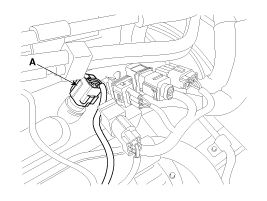
|
|
3. |
Remove the spring clip (A), and then pull the sensor from the
water temperature control assembly.
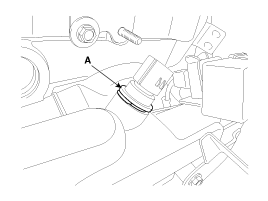
|
Note that engine coolant may be flowed out from the water
temperature control assembly when removing the sensor.
|
|
|
4. |
Supplement the engine coolant (Refer to “Cooling System� in EM
group).
|
Installation
| •
|
Install the component with the specified torques.
|
| •
|
Note that internal damage may occur when the component
is dropped. If the component has been dropped, inspect before
installing.
|
|
| •
|
Apply the engine coolant to the O-ring.
|
|
| •
|
Insert the sensor in the installation hole and be careful
not to damage.
|
|
|
1. |
Installation is reverse of removal.
|
Description
Crankshaft Position Sensor (CKPS) detects the crankshaft position and
is one of the most important sensors of the If there is no CKPS signal input,
the engine may stop because of ...
See also:
Injector. Specifications
Specification
Item
Specification
Coil Resistance (Ω)
1.18 ~ 1.31 [20°C(68°F)]
...
Components and Components Location
Components
1. Piston ring
2. Piston
3. Connecting rod
4. Connecting rod upper bearing
5. Piston pin
6. Connecting rod lower bearing
7. Connecting rod bea ...
To decrease the cruising speed
Follow either of these procedures:
Push the SET- switch and hold it. Your vehicle will gradually slow down.
Release the switch at the speed you want to maintain.
Push the SET- switch and ...

 Hyundai Sonata: Engine Coolant Temperature Sensor (ECTS). Repair procedures
 Engine Coolant Temperature Sensor (ECTS). Schematic Diagrams
 Crankshaft Position Sensor (CKPS). Description and Operation