
 Hyundai Sonata: Using the Room Mirror Key
Selecting the room mirror key will allow you to make service required inquiries, POI info searches, and emergency rescues by connecting to the Blue Link Center.
Such features can be used only after subscribing to the Blue Link service.
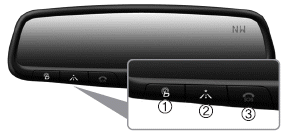
➀  (Blue Link Center)
Makes requests for Blue Link service related inquiries and consultations. A call is connected to the Blue Link service center employee.
Re-pressing the key will end the call. This feature does not operate when you are on a Bluetooth® Wireless Technology phone call.
➁  (Blue Link for POI)
• Blue Link for Voice command
Starts Blue Link voice command.
Voice receiving voice guidance, shortly press the button to convert to voice command mode. Press and hold the button to end voice command.
• TBT VR Commands
1. Navigate to
“Navigate to� voice command is used to request the download of route data for a
new destination, saved destinations, daily routes and previous destinations.
2. Save Destination
“Save Destination� VR command is used to assign a voice tag to the last downloaded
destination and store it in a destination directory.
NOTE:
The Turn by Turn(TBT) feature supports the store of ten(10) destinations in the TBT destinations directory.
3. Route Preview
“Route Preview� VR command allows the user to preview the route instructions (upcoming
maneuver instructions) at any time during the route guidance.
4. Destinations List
“Destinations List� VR command allows the user to preview and delete the stored
destinations with their associated voice tags in the Turn by Turn destinations directory.
5. Voice Guidance
“Voice Guidance� VR command allows the user to mute/unmute the Turn by Turn(TBT)
direction announcements.
6. Suspend Route
“Suspend Route� VR command allows the user to suspend and pause Turn by Turn(TBT)
route guidance while in the guidance mode.
7. Resume Route
“Resume Route� VR command allows the user to resume Turn by Turn(TBT) route guidance.
➂  (Blue Link for SOS)
In the case of an emergency, requests for help to the Blue Link center.
Call is connected to the Blue Link emergency rescue center. Re-pressing the key will end the call.
If already on a Bluetooth® Wireless Technology phone call, the call will end to connect you to the Blue Link Emergency Rescue Center.
CAUTION
- You cannot talk simultaneously on the Bluetooth® Wireless Technology phone and Blue Link phone.
- While on a Bluetooth® Wireless Technology call, pressing the key
or
key will display a message indicating
that you are currently on a call.
- A message will be displayed if you receive a Bluetooth® Wireless Technology
call while already on a Blue Link call. At this time, press the
 key on the steering wheel remote
controller to accept the call. The phone bell will not ring.
key on the steering wheel remote
controller to accept the call. The phone bell will not ring.
 Blue Link
Hyundai aims to offer differentiated customer values through a ‘Connected Car
Life,’ which is to provide consumers with fast and reliable IT technology. As consumers’
lifestyles become more ...
 Eco Coach
• What is Eco Coach?
Every 2.5 minutes, Eco Coach compares your fuel economy against the government
tested average (EPA) or other similar Hyundai models (community), based on your
preference. ...
See also:
Side repeater light bulb replacement
If the light bulb is not operating, have the vehicle checked by an authorized
HYUNDAI dealer. ...
Knock Sensor (KS). Schematic Diagrams
Circuit Diagram
...
Restrictions in handling keys
When leaving keys with parking lot and valet attendants, the following procedures
will ensure that your vehicle’s trunk and glove box compartment can only be opened
with the mechanical key.
L ...
