
 Hyundai Sonata: Multimedia jack. Repair procedures
Removal
| 1. |
Remove the shift lever knob.
(Refer to the BD group - "Console")
|
| 2. |
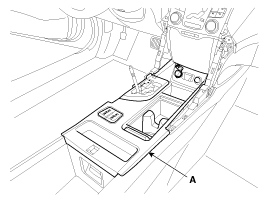
Remove the console upper cover (A).
|
| 3. |
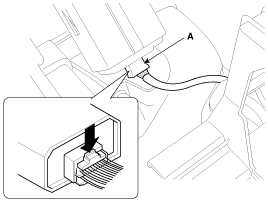
Disconnect the connector (A) from the console upper cover.
|
| 4. |
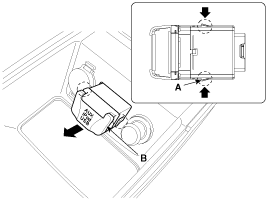
Remove the multimedia jack (B) from the console under cover after
releasing the fixed hooks (A).
|
Installation
| 1. |
Install the multimedia jack.
|
| 2. |
Connect the multimedia jack connector.
|
| 3. |
Install the console upper cover.
|
| 4. |
Install the shift lever knob.
|

 Multimedia jack. Description and Operation
Description
The multimedia jack on the console upper cover is for customers who like
to listen to external portable music players like the MP3, iPod and etc., through
the vehicle's sound ...
 Troubleshooting
Troubleshooting
Symptom
Suspected area
Repairment
Pressing power switch does not turn on system
Radio receiver power source circuit
...
See also:
Curtain Airbag (CAB) Module. Description and Operation
Description
Curtain airbags are installed inside the headliner (LH and RH) and protect
the driver and passenger from danger when side crash occurs. The SRSCM determines
deployment of curtain ...
Rear Assist Arm. Repair procedures
Replacement
1.
Remove the rear wheel & tire.
Tightening torque:
88.3 ~ 107.9 N.m (9.0 ~ 11.0 kgf.m, 65.1 ~ 79.6 lb-ft)
...
Battery Caution Label Description
Warning / Caution Label (Cont'd)
A.
Keep lighted cigarettes and all other flames or sparks
away from the battery.
B.
Wear eye protection ...
