
 Hyundai Sonata: Multimedia Jack. Repair procedures
Removal
| 1. |
Remove the shift lever knob.
(Refer to the BD group - "Console")
|
| 2. |
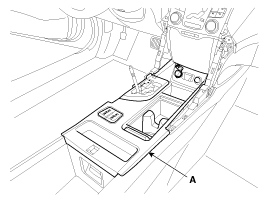
Remove the console upper cover (A).
|
| 3. |
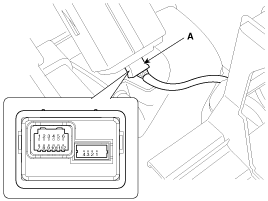
Disconnect the connector (A) from the console upper cover.
|
| 4. |
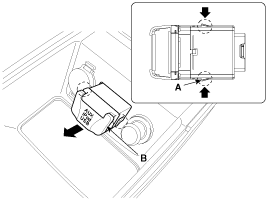
Remove the multimedia jack (B) from the console under cover after
releasing the fixed hooks (A).
|
Installation
| 1. |
Install the multimedia jack.
|
| 2. |
Connect the multimedia jack connector.
|
| 3. |
Install the console upper cover.
|
| 4. |
Install the shift lever knob.
|

 Multimedia Jack. Description and Operation
Description
The multimedia jack on the console upper cover is for customers who like
to listen to external portable music players like the MP3, iPod and etc., through
the vehicle's sound ...
 MTS System
...
See also:
Battery. Repair procedures
Removal and Installation
1.
Disconnect the terminals from the battery.
Tightening torque :
(+) terminal (A) : 7.8 ~ 9.8N.m (0.8 ~ 1.0kgf. ...
Front Wheel Speed Sensor. Repair procedures
Removal
1.
Remove the front wheel and tire.
Tightening torque:
88.3 ~ 107.9 N.m (9.0 ~ 11.0 kgf.m, 65.1 ~ 79.6 lb-ft)
...
Description and Operation
Function
Audio Bluetooth System
General Feature
•
This audio system supports Bluetooth®hands-free and stereo-headset
features.
- HANDS-FREE featur ...
