
 Hyundai Sonata: Telemetics Unit (TMU). Repair procedures
Removal
| 1. |
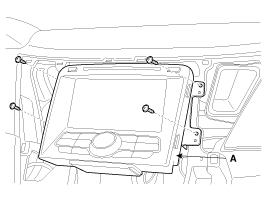
Remove the audio monitor (or AVN head unit) after loosening the
mounting screws.
(Refer to the BE group - "Audio Unit" or "AVN Unit")
|
| 2. |
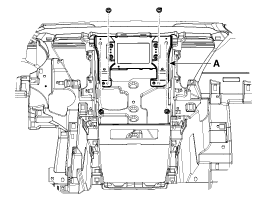
Remove the MTS unit (A) after loosening the mounting screws.
|
Installation
| 1. |
Install the MTS unit.
|
| 2. |
Install the audio monitor (or AVN head unit) and crash pad center
fascia panel.
|
Inspection
| 1. |
After replacing the TMU, connect to "call center" by pushing the
Blue Link button.
|
| 2. |
If Blue Link service connected successfully, and then technician
can hear the "Welcome to Hyundai Bluelink" sound.
|


 Mic. Repair procedures
Inspection
1.
Disconnect the negative(-) battery terminal.
2.
Remove the roof trim.
(Refer to the BD group - "Roof trim")
...
See also:
Coolant. Repair procedures
Refilling And Bleeding
Never remove the radiator cap when the engine is
hot. Serious scalding could be caused by hot fluid und ...
How vehicle audio works
AM and FM radio signals are broadcast from transmitter towers located around
your city. They are intercepted by the radio antenna on your vehicle. This signal
is then received by the radio and s ...
Battery recharging
Your vehicle has a maintenance-free, calcium-based battery.
If the battery becomes discharged in a short time (because, for example,
the headlights or interior lights were left on while the veh ...
