
 Hyundai Sonata: MENU : Audio CD
Press the CD MP3 mode  key to set
the Repeat, Random, Information features.
key to set
the Repeat, Random, Information features.
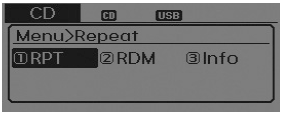
Repeat
Press the key
► Set [![RPT] through the TUNE knob or](images/books/661/6/page.h17.png) RPT] through the
RPT] through the  TUNE knob or
 key to repeat the current song.
❈ Press RPT again to turn off.
Random
Press the key
► Set [![RDM] through the TUNE knob or](images/books/661/6/page.h18.png) RDM] through the TUNE knob or
RDM] through the TUNE knob or
 key to randomly play songs within
the current folder.
key to randomly play songs within
the current folder.
❈ Press RDM again to turn off.
Information
Press the key Set
► [![Info] through the TUNE knob or](images/books/661/6/page.h19.png) Info] through the TUNE knob or
Info] through the TUNE knob or
 key to display information of the
current song.
key to display information of the
current song.
❈ Press the key to turn off info
display.
 BASIC METHOD OF USE : Audio CD / MP3 CD / USB / iPod / My Music
Press the key to change the mod
mode in order of CD➟USB(iPod)➟AUX ➟My Music➟BT Audio.
The folder/file name is displayed on the screen.
❈ The CD is automatical ...
 MENU : MP3 CD / USB
Press the CD MP3 mode key to set
the Repeat, Folder Random, Folder Repeat, All Random, Information, and Copy features.
Repeat
Press the key
► Set [
RPT] through the TUNE knob or key ...
See also:
Specifications
Specifications
Item
Specification
Type
Motor driven power steering system(EPS)
Steering gear
Type
Rack &am ...
Theft-alarm stage
The alarm will be activated if any of the following occurs while the system is
armed.
A door is opened without using the transmitter (or smart key or mechanical
key).
The trunk is opened wi ...
Repair procedures
Inspection
1.
Remove the cowl top cover. (Refer to the wiper)
2.
Disconnect the windshield deicer connector (A) from the wiper
motor linka ...
