Inspection
|
1. |
Check the signal waveform of the CMPS and CKPS using the GDS.
Specification:
Refer to “Wave Form�
|
|
Removal
| •
|
DON’T remove the camshaft position sensor while the engine
is running or right after engine is turned off. The part and
engine oil is hot and can cause burns.
|
|
|
1. |
Turn the ignition switch OFF and disconnect the battery negative
(-) cable.
|
|
2. |
Disconnect the camshaft position sensor connector (A).
|
|
3. |
Remove the installation bolt (B), and then remove the sensor.
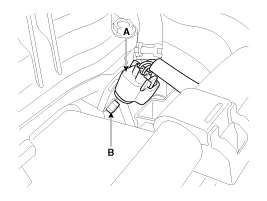
|
|
1. |
Turn the ignition switch OFF and disconnect the battery negative
(-) cable.
|
|
2. |
Disconnect the camshaft position sensor connector (A).
|
|
3. |
Remove the hanger and the protector.
|
|
4. |
Remove the installation bolt (B), and then remove the sensor.
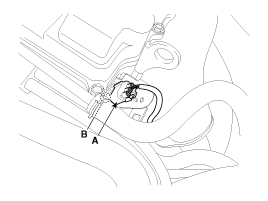
|
Installation
| •
|
Install the component with the specified torques.
|
| •
|
Note that internal damage may occur when the component
is dropped. If the component has been dropped, inspect before
installing.
|
|
| •
|
Apply the engine oil to the O-ring.
|
|
| •
|
Insert the sensor in the installation hole and be careful
not to damage.
|
|
| •
|
Be careful not to damage the sensor housing and the connector.
|
| •
|
Be careful not to damage the O-ring.
|
|
|
1. |
Installation is reverse of removal.
Camshaft position sensor installation
bolt:
9.8 ~ 11.8 N.m (1.0 ~ 1.2 kgf.m, 7.2 ~ 8.7 lb-ft)
|
|
Description
Knocking is a phenomenon characterized by undesirable vibration and noise
and can cause engine damage. Knock Sensor (KS) is installed on the cylinder
block and senses engine knoc ...
See also:
Driving off-road
Drive carefully off-road because your vehicle may be damaged by rocks or roots
of trees. Become familiar with the off-road conditions where you are going to drive
before you begin driving. ...
Components and Components Location
Components
...
Start/Stop Button. Repair procedures
Removal
1.
Disconnect the negative(-) battery terminal.
2.
Remove the crash pad lower panel.
(Refer to the BD group - "Crash pad&q ...

 Hyundai Sonata: Camshaft Position Sensor (CMPS). Repair procedures

 Camshaft Position Sensor (CMPS). Schematic Diagrams
 Knock Sensor (KS). Description and Operation