
 Hyundai Sonata: MENU : iPod
In iPod mode, press the  key to
set the Repeat, Album Random, All Random, and Information features.
key to
set the Repeat, Album Random, All Random, and Information features.
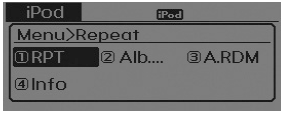
Repeat
Press the key Set [1 RPT] through
the  TUNE knob or
 key to repeat the current song. ❈
Press RPT again to turn repeat off.
key to repeat the current song. ❈
Press RPT again to turn repeat off.
Album Random
Press the key Set [2 Alb.RDM]
through the TUNE knob or
 key. Plays albums within the currently
playing category in random order. ❈ Press Alb.RDM again to turn off.
key. Plays albums within the currently
playing category in random order. ❈ Press Alb.RDM again to turn off.
All Random
Press the key Set [3 A.RDM] through
the TUNE knob or
 key. Plays all songs within the currently
playing category in random order. ❈ Press A.RDM again to turn off.
key. Plays all songs within the currently
playing category in random order. ❈ Press A.RDM again to turn off.
Information
Press the key Set [4 Info] through
the TUNE knob or
 key. Displays information of the
current song.
key. Displays information of the
current song.
❈ Press the key to turn off info
display.
 MENU : MP3 CD / USB
Press the CD MP3 mode key to set
the Repeat, Folder Random, Folder Repeat, All Random, Information, and Copy features.
Repeat
Press the key
► Set [
RPT] through the TUNE knob or key ...
 MENU : My Music Mode
In My Music mode, press the key
to set the Repeat, Random, Information, Delete, Delete All, and Delete Selection
features.
Repeat
Press the key
► Set [ RPT] through the
TUNE knob or ...
See also:
Trailing Arm. Repair procedures
Replacement
1.
Remove the rear wheel & tire.
Tightening torque:
88.3 ~ 107.9 N.m (9.0 ~ 11.0 kgf.m, 65.1 ~ 79.6 lb-ft)
...
Components and Components Location
Components
1. Front seat belt
2. Height adjuster
3. Rear seat belt (RH)
4. Rear center seat belt
5. Rear seat belt (LH)
6. Rear center seat belt buckle
...
Antenna Coil. Repair procedures
Replacement
1.
Disconnect the negative (-) battery terminal.
2.
Remove the steering column upper and lower shrouds after loosening
the scr ...
